INTERFACE CRITIQUE · PRODUCT REDESIGN APPLE CALENDAR
From friction points to a clearer interface.
A focused interface critique that identifies moments of confusion, maps the task flow, and turns findings into a more intuitive redesign.
ROLE · UX/UI DESIGNER
METHODS · HEURISTIC REVIEW, TASK FLOW
YEAR · 2026
01 / INTERFACE AUDIT
The original flow asked users to work too hard.
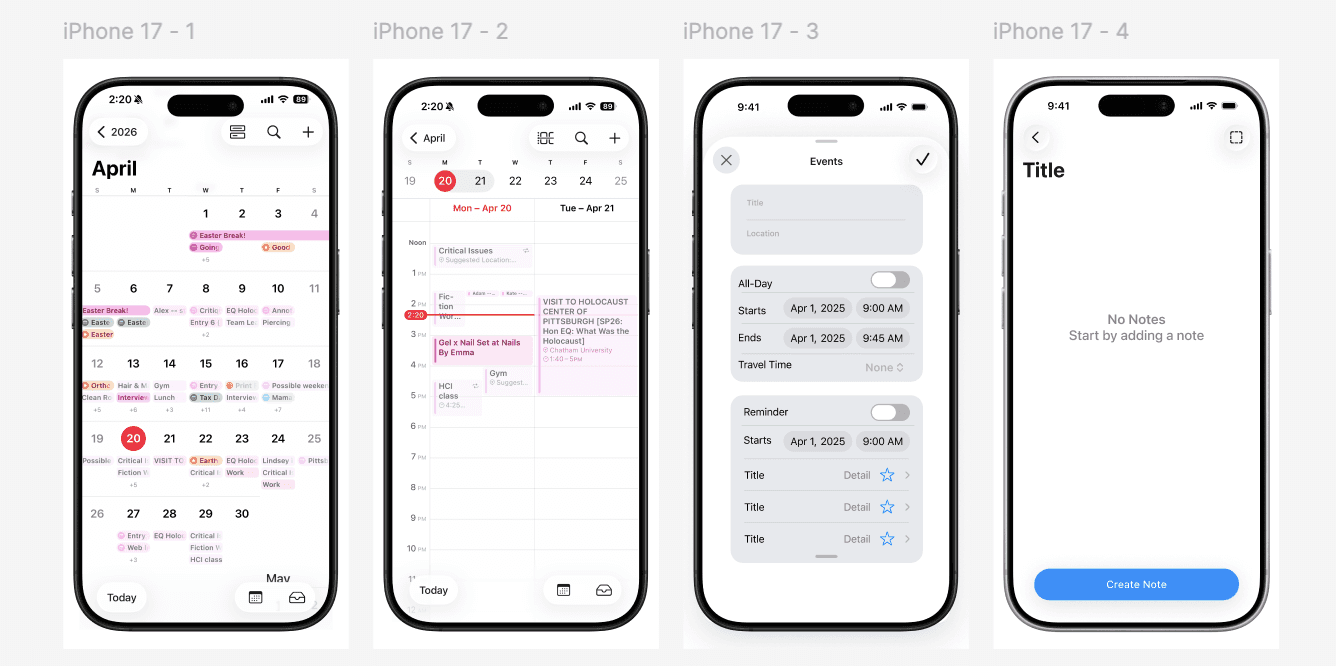
Some of the key points that are the downfall of Apple's clean minimalistic design is it's lack of detail, users having not being able to see multiple events in one day simply because it condenses too much on the month view, another critique of this interface is it's poor toggling from event to reminders, not integrating them seamlessly into the calendar.
02 / REDESIGN DIRECTION
The redesign organizes information around what the user is trying to accomplish—not around the product’s internal simplicity.
03 / TASK FLOW
A clearer path to planning.
Task flow comparing the implemented design of Apple Calendar compared to the task flow of a redesigned version. Click for the Figma link.

04 / REDESIGN SCREENS & TASK FLOW

05 / TAKEAWAYS
What the redesign improves.
The revised interface is guided by clearer priorities, a more direct path to completion, and feedback that makes each action feel understood.
01 — Ability to switch from a more compact design to a more expanded calendar.
02 — Non separated events and reminders, integrating them together.
03 — Ability to customize across the board, allowing for individual user needs.